
What is a .GLB file
GLB stands for Graphics Language Transmission Format Binary. It is a standardized file format that stores 3D models, textures, and animation data all within a single file. It is like a digital container that packs everything a 3D object needs into one lightweight package. The binary structure (computer code) compresses complex data efficiently. This makes GLB models easy to share and ensures they load instantly for smooth 3d viewing on any website or phone.
A GLB file is the binary file format of the glTF (Graphics Language Transmission Format) standard. While the standard glTF file relies on separate external files for textures and 3D data, the GLB version combines all these elements—3D geometry, textures, shaders, and animation—into one single file.
The compact and self-contained nature of GLB models makes them the industry standard for interactive online product views. GLB is for 3D, just like JPEG is for images.
How to Create a 3D Model of Your Product in GLB format
Generally, there are three steps in creating the 3D GLB for your product.
1. Modeling
Modeling is the process of building the digital geometry of your product, defining its physical shape and structure in 3D space. This stage creates a wireframe mesh that serves as the essential foundation for all surface details and textures added later. A well-constructed 3D model is crucial for ensuring that GLB models look realistic and perform efficiently.
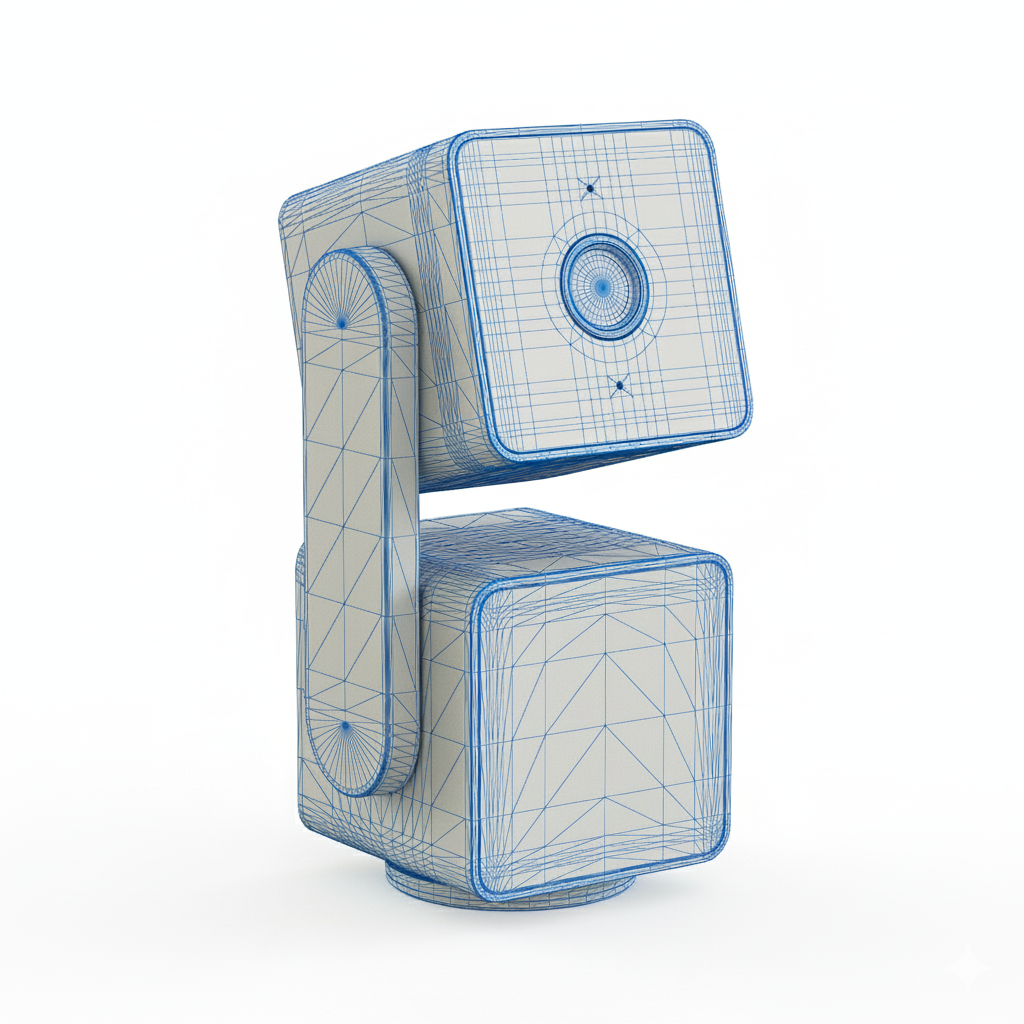
Wireframe view: 3D Model of a Camera
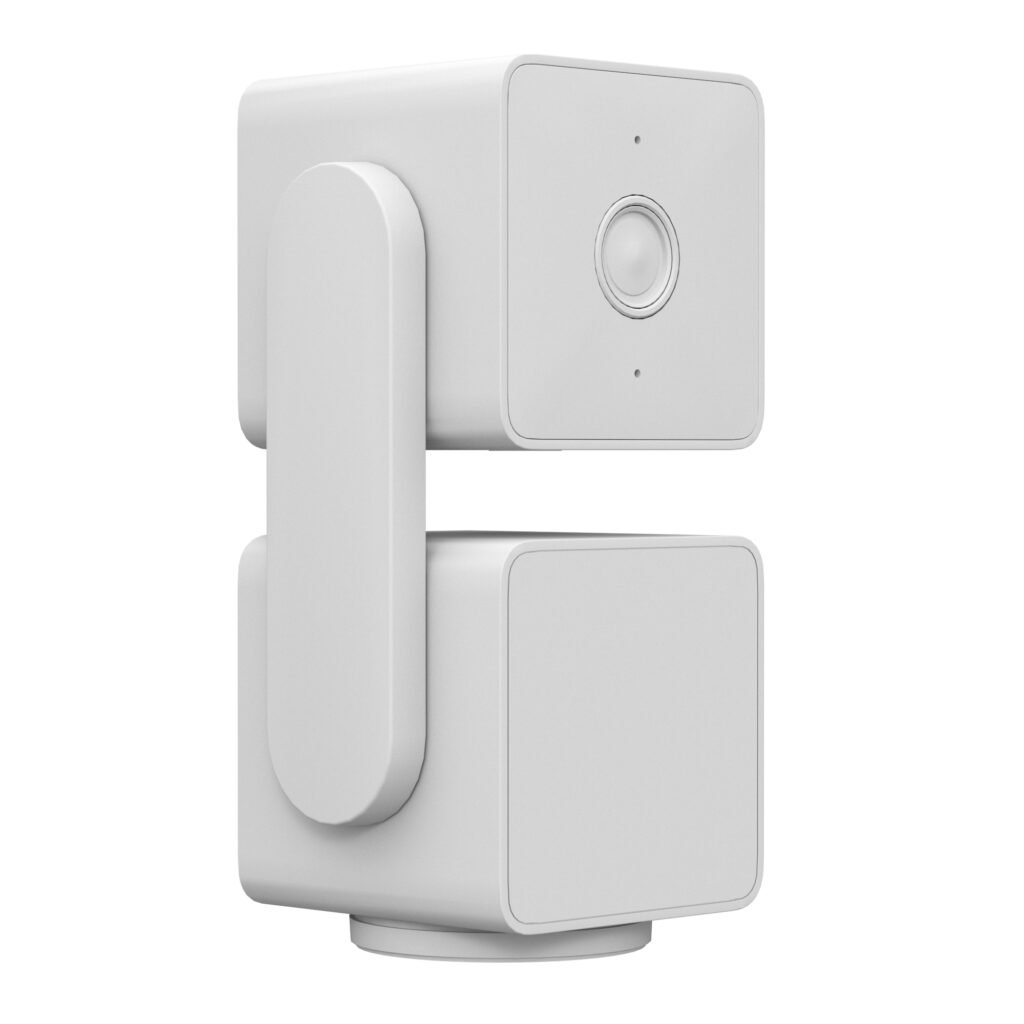
Grayscale view: 3D Model of the Camera
2. Texturing
Texturing involves wrapping the model with materials to define how the surface looks and interacts with light. This step assigns visual properties like color, roughness, and reflection to make the object appear real and lifelike. High-quality texturing transforms a plain grayscale model into a product visual that customers can examine closely.
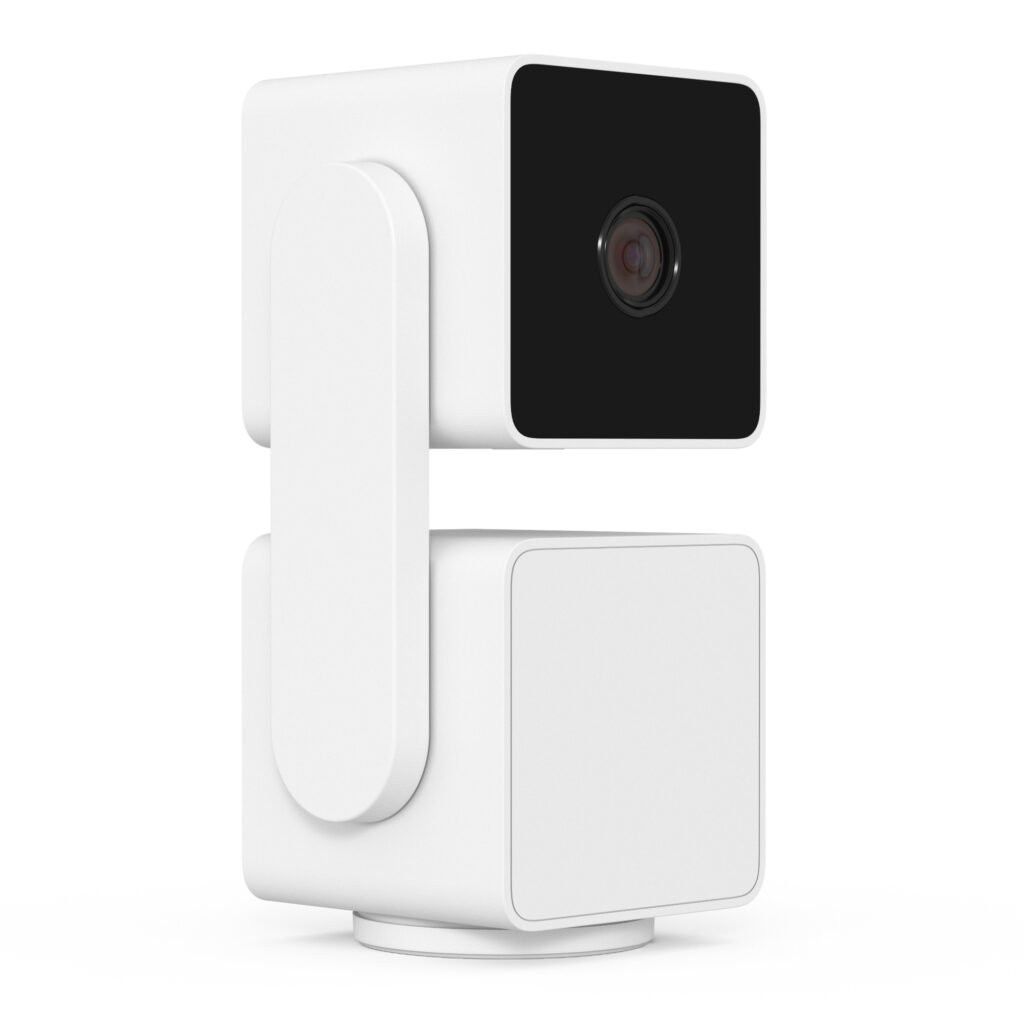
3D Model with Textures Applied
3. Optimizing
Optimizing is the final phase where the complex data is refined to ensure the file loads instantly on web and mobile platforms.
This process reduces file size by simplifying geometry and compressing textures while maintaining visual fidelity. Efficient optimization allows GLB models to perform smoothly in modern e-commerce browsing.
Business Cases of how GLB Files were used to Enhance Customer Experience
1. Backyard Discovery :Backyard Discovery is a leading manufacturer of high-quality outdoor wooden playsets, premium backyard leisure structures like pergolas and outdoor kitchens designed to bring families together.

Business case: Since they focus on outdoor structures, which are large in size, gauging the scale of the product by looking at static images is difficult. With the 3D/AR, the shopper can visualize the products in their own backyard. Exploring the 3D model by zooming in and viewing around also gives an immersive experience for the viewer.
Poppy Greenhouse
The product here is a backyard greenhouse built of cedar wood and glass, offering all-weather gardening. It occupies a footprint space of 9ft x 6ft and is around 8ft high. Made from durable cedar wood for exceptional strength and natural resistance to decay. The wood is pre-stained in a light brown finish, designed to highlight the natural grain of the cedar while providing weather resistance. Just by looking at pictures of the product, the customer may not be able to estimate its size. A GLB greatly helps in this, as the product can be viewed in AR. Also, by moving the product around and being able to see the interiors, the shopper could feel the lifestyle associated with it.
The Backyard Discovery Paxton 2-4 Person Outdoor Barrel Sauna is a traditional Finnish-style sauna designed to bring the spa experience into a residential backyard. Its distinct barrel shape is not just aesthetic; it promotes superior air circulation, ensuring heat is distributed evenly without getting trapped at the ceiling. It is approximately 6.5 ft wide and 5.5 ft long. To mentally visualize the size of the product is not easy. GLB helps in reducing the cognitive load of the customer by letting them view the product in their space. The 3D model also helps in inspecting the details like the wood finish, the joints, the glass door, the sauna stones and the overall feel of the product. This is important as the buyer needs to have complete confidence to purchase a premium product.
2. Hypershop : Hypershop designs cutting-edge tech accessories, including high-speed USB-C hubs, docking stations, and portable power banks.

Business Case: In the consumer electronics industry, the inspection of the product by the shopper plays an important role in influencing buying decisions. A GLB model gives shoppers the virtual experience equivalent of holding the product in their hands and analyzing the ports and other features of the product.
For example,the above product is a connectivity hub called docking station, the ports are located on the side of the product. It is difficult for some consumers to understand the orientation and location of the ports. The GLB file allows for a comprehensive visual understanding.
3. MrBrands: Mr. Brands is an industry leader in manufacturing licensed products for major names across the globe.

Business Case: Assessing the actual size of a product from images could be confusing. A GLB file helps in seeing the product in the viewer’s space in real world scale giving him a true sense of size, scale and proportions of the product. This enables a confident shopping experience with more trust in the product and the brand. It also enhances the shopper’s desire for the product.
The product here is an oscillating digital tower heater for indoor use. It is 26 inches tall but the size cannot be assessed immediately from the picture. Using GLB, the size and proportions of the heater can be visualized easily. Even in online mode, the shopper is able to get the feel of holding the product, rotating it around and see all the details. This helps in understanding the product fully and make a confident purchase.
4. Brosa : Brosa is a modern furniture brand that delivers designer-quality pieces directly to consumers. They offer a curated range of stylish sofas, beds, and dining furniture, focusing on accessible luxury and contemporary aesthetics.
Business Case: GLB helps in visualizing the furniture in the shopper’s space. Viewing the product from all sides helps in inspecting the furniture design and textures in detail. This creates an emotion of owning and using the product, leading to increased conversions.
The product above is a wooden sideboard. If the size is not assessed properly before buying, it can lead to expectation mismatch, product return and negative brand perception. GLB helps in understanding how long the sideboard actually is and will it fit in the customer’s space. It also allows for detailed product inspection from all angles.
5. Spring Meadow Nursery: Spring Meadow Nursery is a premier plant propagator. They specialize in introducing superior, colorful flowering shrubs and vines to the market across North America.

Business Case: Nursery provides a large variety of plants of varying sizes. While the flowers and the details of the plant can be clearly seen in pictures, the actual size of a grown shrub is difficult to assess by seeing images alone. A shopper may buy a plant shrub, thinking it will be of a particular size and will grow to a certain size. But in reality, if the plant is too big, the garden space or interior space may not be sufficient. If the plant is too small, it may not be able to satisfy the aesthetic expectation the customer had in mind. It is also difficult to plan garden layouts without knowing the shrub sizes clearly. GLB 3D models help in clearly assessing the space the plant takes through augmented reality.
GLB model of Let’s Dance Arriba Hydrangea Shrub
GLB model of Perfecto Mundo Orange Azalea Shrub
6. Wyze: Wyze Labs produces high-quality smart home devices, most notably compact smart cameras and home security sensors.
Business Case: Wyze makes high-tech home cameras. These cameras can be fitted on a wall, roof, shelf or other places. Just by seeing pictures of the product, the customer cannot judge whether a space is right for the camera to be fitted. By using 3D/AR enabled by GLB models, the shopper gains better spatial awareness on how to position the camera. For example, the shopper could envision placing the product in a living room shelf which is of a particular dimension. However, once he has bought the camera he realises that the product is too tall to fit in the shelf and has no other position to place it. This would lead to a product return. It also helps in viewing the high-tech camera from different angles, giving a comprehensive product understanding thereby increasing trust in the quality of the product and hence the brand. A GLB showcase subliminally tells a shopper that this brand has nothing to hide.
The product above is the Wyze Cam OG Stack. It shows how two wyze cameras can be mounted one over the other to get different views. In this example shown, the top camera is a telephoto camera offering high zoom. It is paired with a wide-angle camera at the bottom. A GLB file helps in visualizing the height of the stacked cameras and deciding where to install or place this camera in the house. It also helps in understanding the stacking mechanism involved in the process, giving clarity to the user and making it easier to use.
7. Mount-It: Mount-It specializes in ergonomic mounting solutions, offering a vast array of monitor arms, TV wall mounts, and standing desks. They focus on improving workspace comfort and productivity.

Business Case: Mount-It faced the issue of product returns due to mismatch in size expectations. A ‘try before you buy’ experience enabled by a GLB file helped in setting the right product expectations and return rates reduced. Also, as Mount-It focuses on ergonomic solutions, seeing the product in 3D helps the viewer better understand the functionality of the product and how it can enable a more comfortable and sustainable working position.
The product is a height-adjustable tabletop standing desk converter. It has a 30-inch wide desk along with a keyboard tray. The 3D model helps in clearly seeing all the components of the product and viewing it in the user’s own space. This promotes product transparency and also gives the shopper trust in the product.
Benefits of Showcasing Your Product in 3D Using GLB
Enhanced Product Understanding
A 3D model allows customers to rotate the product 360 degrees, zoom in on textures, and inspect it from every angle. This interactivity bridges the gap between online browsing and visiting a physical store, helping users fully grasp the product’s size, shape, proportions, texture and features. According to Amazon, “By adding 3D content to your product, customers get a richer, more immersive experience to learn about your products. From a study conducted in 2022, it is seen that users who click ‘View in 3D’ or ‘View in AR’ show a 2 times higher conversion rate.”
Confident Shopping Experience
Uncertainty is the biggest killer of online sales. By offering a clear GLB model, you remove the guesswork regarding size, scale, and material quality. An article by Forbes states that “interactive 3D content can shorten the buying cycle by providing all necessary visual data upfront”. This transparency significantly boosts buyer confidence, making them less hesitant to make a purchase.
Evoke a Desire to Buy
A study titled ‘A Systematic Review of Psychological Ownership of Interactive Virtual Objects’ published in CHI Conference states that “interacting with a product in 3D creates a psychological sense of ownership”. When a customer plays with a model, spinning it, opening it, or placing it in their room, they start to feel like they already own it. This emotional connection is far stronger than what passive images can achieve. It turns a casual browser into an excited buyer who can visualize the product in their life.
Better Site Engagement
3D model is a magnet for attention. Shoppers spend up to 50% more time on product pages that feature interactive 3D elements compared to those with just images. Marketing campaigns utilizing 3D formats, such as Google’s Swirl 3D ads, have demonstrated a 4x increase in engagement rates. This increased dwell time signals to search engines that your website is valuable, which can improve your SEO rankings. It keeps customers entertained and engaged, reducing the likelihood that they will bounce to a competitor’s site.
Increased Conversions
The data is clear: 3D sells better. According to Shopify, there is a 94% average conversion lift for products with 3D/AR content vs. those without. When customers understand exactly what they are buying, they are much more likely to complete the purchase. GLB models provide the clarity and confidence needed to close the sale.
Reduced Product Returns
A major reason for returns is that the product looked different online than in reality. By providing an accurate, rotatable view, you set the right expectations regarding color, texture, and size. A Report by McKinsey states that 3D visualization can reduce return rates by up to 30-40%. Fewer returns mean you save money on shipping and logistics while keeping your customers happy.
Enhanced e-Commerce Performance
Integrating 3D models into your product pages can significantly boost your search rankings on e-commerce platforms. E-commerce algorithms prioritize listings that offer a superior user experience, giving an edge to brands that utilize 3D technology over those that rely solely on static images. Amazon’s A10 algorithm heavily weights conversion rate and time on page. Since 3D models are proven to double purchase likelihood, they directly feed the algorithm’s positive signals, pushing the listing higher in organic search results. This competitive advantage in visibility directly translates to better traffic and overall business performance.
Easy Mobile Viewing
According to data by Statista, mobile devices drive roughly 60% of global e-commerce sales as of 2023-2024, with this share expected to reach 62% by 2027.GLB files are well-suited for the mobile web. They are lightweight and load instantly on smartphones without requiring customers to download any special apps. Since most e-commerce traffic comes from mobile devices, using this efficient format ensures a smooth shopping experience.
AR Compatibility
One of the biggest perks of GLB is that it is AR-ready. Customers can instantly tap a button to view the product in their actual space using Augmented Reality. Whether checking if a sofa fits in the living room or if a coffee maker fits on the counter, AR solves physical sizing questions instantly. Shopify states that visitors were 65% more likely to place an order after interacting with a product in AR. This feature is a massive driver for sales of furniture and home goods.
Build Brand Trust
Adopting 3D technology shows that your brand is modern, professional, and transparent. It tells customers that you have nothing to hide and are willing to invest in their shopping experience. High-quality 3D rendering positions you as a premium seller compared to competitors using low-quality or limited photos. A Deloitte Report noted that companies with branded AR/3D experiences are 41% more likely to be considered by consumers, and nearly 3 in 4 consumers say they’re willing to pay more for a product that promises the transparency that AR can provide.
Inputs Required for Creating GLB
To create a 3D GLB model, the following inputs are required:
- Product reference images
- Product dimensions
- Texture reference images
- A CAD file of the product (good to have if available)
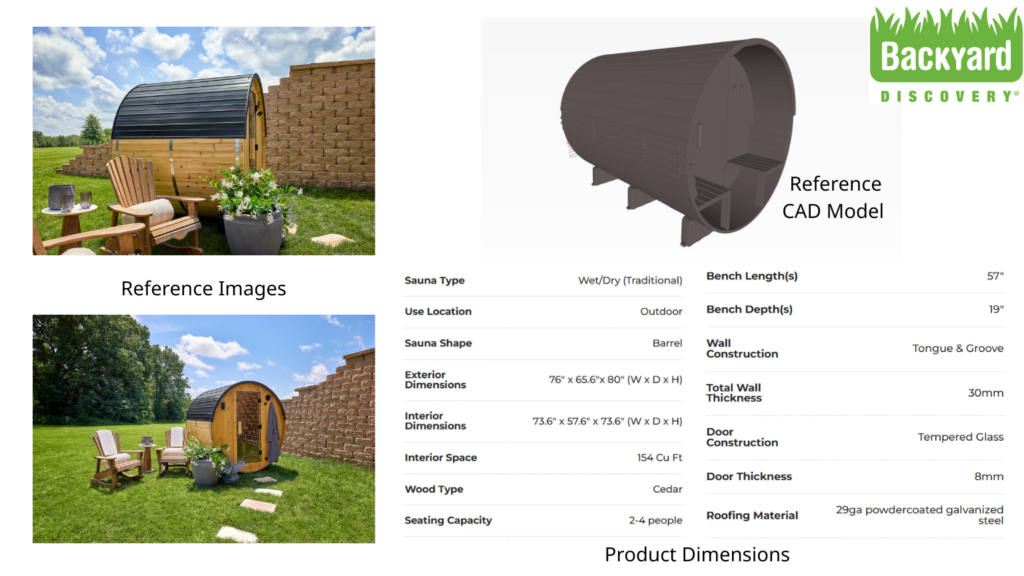
Inputs for Creating GLB Model of a Backyard Sauna House
It is to be noted that the CAD file cannot be used directly as it is to create the GLB. Industrial CAD files are usually huge in size, having a large polygon count running into millions and containing too many intricate geometry details not required for creating a GLB. So the CAD file you provide us has to be retopologized and optimized to create the required 3D model for GLB.
Breakdown of GLB Optimization
Optimizing involves the following aspects:
1.Geometry(Mesh) Optimization
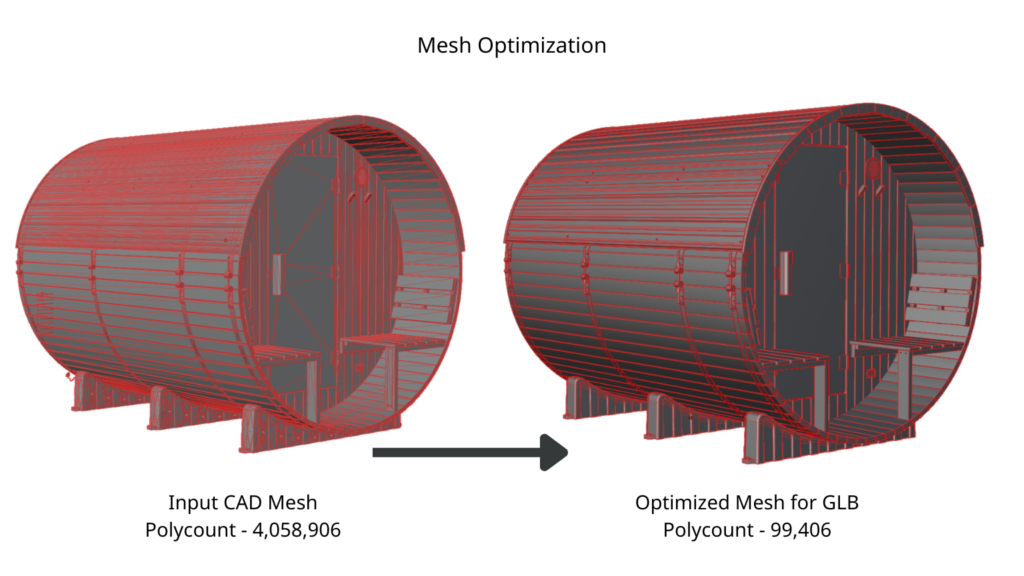
The ‘mesh’ is the wireframe structure of your 3D model, made up of a large number of tiny polygons. High-fidelity master 3D files often contain millions of polygons. We lower the number of polygons significantly—often from millions down to thousands while maintaining the object’s original silhouette and smooth shading. A well-optimized mesh looks identical to the high-poly version but is mathematically much simpler.
2. Texture Optimization
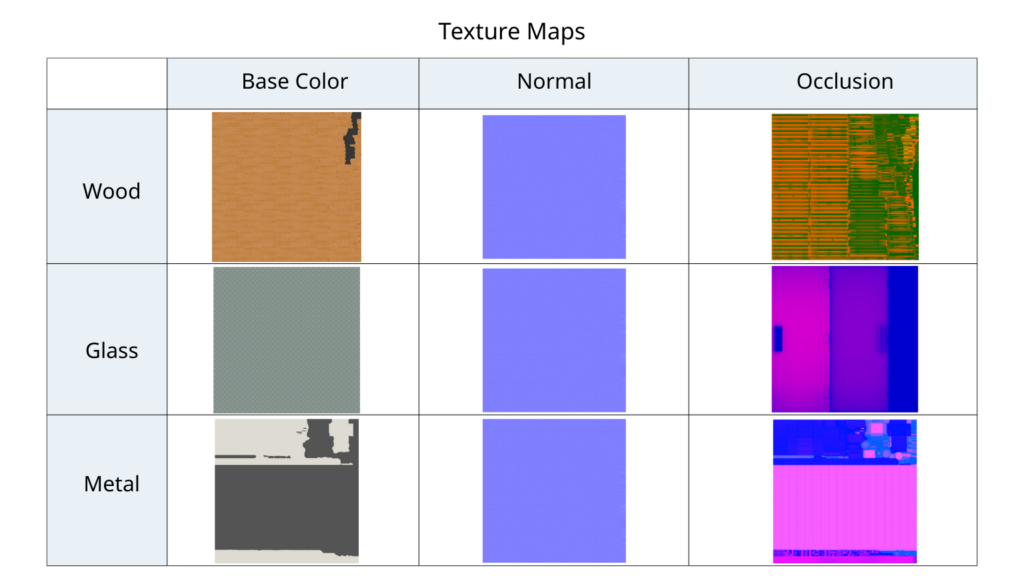
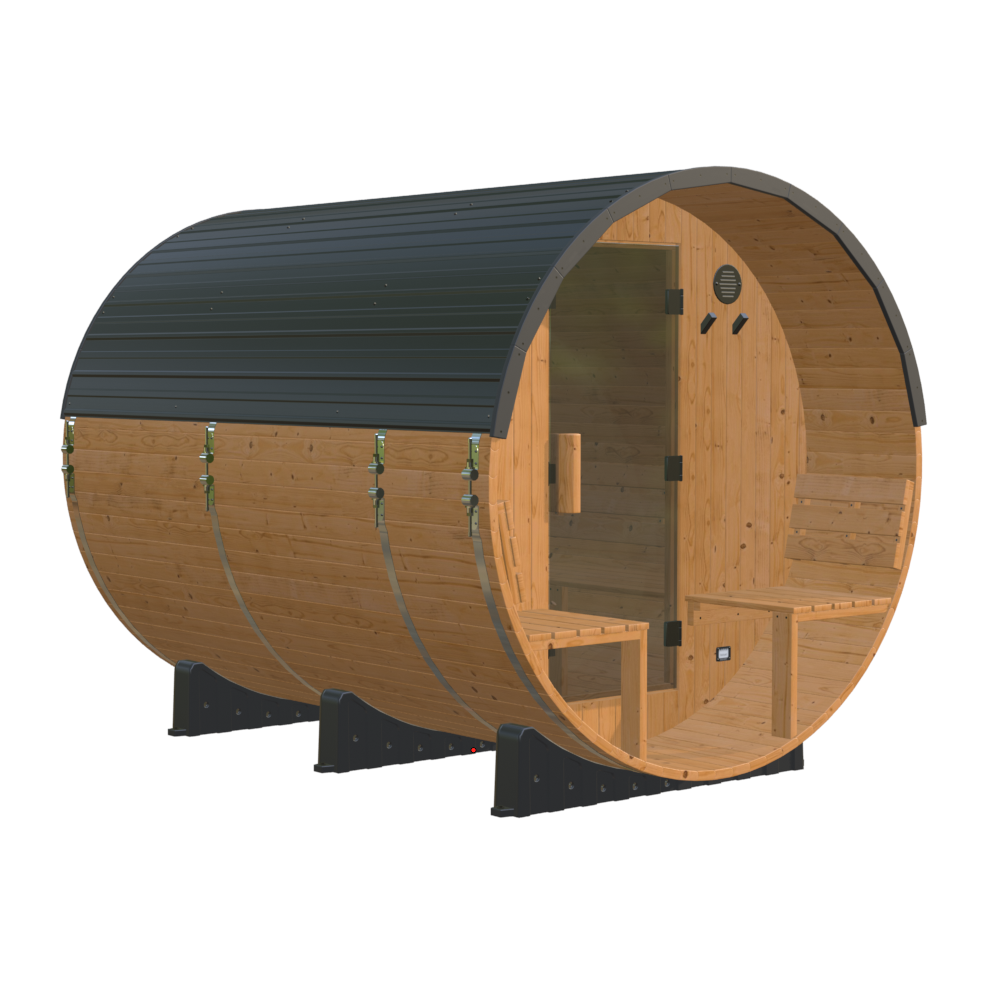
GLB with Texture Applied
High-resolution textures (like 4K or 8K maps) occupy the most space in a GLB file. We optimize textures by resizing them to standard web resolutions, typically 2K (2048×2048). We also use efficient compression formats to reduce the file weight without making the product look blurry.
3. Level of Detail Optimization
We also optimize the level of detail required in the 3D file. Eliminating any unnecessary fine details could reduce the file size to a large extent. For example, removing a complex internal component that is not visible from the outside.
The above processes together help in bringing the overall file size to an optimum level for a good 3D model viewing experience.
Importance of Optimization for GLB
In simple terms, optimization is the art of finding the perfect balance between performance and quality. It ensures that a 3D model is compact enough to load instantly on the web while retaining enough visual detail to accurately represent the product.
If the file is not optimized (size is too big), the visual quality might be excellent, but the heavy file takes longer to load and lags while rotating or zooming, resulting in a poor overall user experience. A heavy 3D model can also affect accessibility, as it can be viewed well only in high-capability devices with powerful computing power and fast network speed. All of this can lead to a negative emotional response in the user, damaging brand perception.
On the other hand, if a file is over-optimized (made too small), the visual quality degrades significantly. Textures may look blurry, and edges may appear jagged. A low-quality GLB model can make even a premium product look cheap, dissuading the buyer from making a purchase.
Creating a GLB file is, therefore, a double-edged sword. When done correctly, it provides a highly engaging, interactive experience that boosts desire and confidence. If done poorly, it can ruin the shopping experience entirely.
To prevent these issues, major e-commerce platforms like Amazon and Shopify enforce strict 3D model specifications. Your GLB files must be professionally optimized to meet these technical standards to ensure they run smoothly for millions of daily shoppers.
For example, Amazon specifications state that polygon count should not exceed 200K and texture resolution should be not more than 4K and not less than 2K. Shopify recommends a file size of less than 15 MB for 3D models, while the maximum allowed size for upload is 500 MB.
Custom Requirement for Spring Meadow Nursery
Some brands also have their own custom requirements for GLB models to showcase on their own website or a different platform. For example, we worked with Spring Meadow Nursery, which is a premier plant propagator in North America.
They have to integrate 3D models of their plants inside a layout design software application, enabling users to shop for real plants that they visualize in their spaces. This meant hundreds of different plants had to be loaded simultaneously in a scene. The goal was not to show plants realistically as the client had plant pictures for that; the goal was to represent the size and shape of the plant inside the application. To achieve this without crashing the application, we had to create light GLB models that represented the size of the plant while adhering to an extremely low polygon count and high node optimization.
Thus, optimization has to be done depending upon the use cases of the 3D model being created.
GLB Showing Product Functionality
A GLB doesn’t always have to be a simple 3D model of a product. It can include animations and interactive elements to help the user better understand the product’s features. Using GLBs, you can guide the customer through the product’s features and functionality just like a salesperson would in a physical store.
Triggered Animations
Standard 3D models are static, but GLB models can store complex animations that play on command. You can set up touch points or buttons on the viewer. When a customer clicks a specific button (e.g., “Open”), the model reacts instantly.
For example, if you sell a sofa bed, the customer clicks a button, and the 3D sofa unfolds into a bed right on their screen. If you sell a laptop, clicking the lid can make it open and close.
Interactive Hotspots
Hotspots are small interactive dots placed on specific parts of your product. They act as digital labels that declutter your product page while providing deep detail. When a customer hovers their mouse or taps their finger over a hotspot, a small box pops up giving specific information about that part or feature.
For example, on a luxury watch model, a hotspot over the glass might read “Sapphire Crystal – Scratch Resistant,” while a hotspot on the strap explains “Genuine Italian Leather”.
Adding these interactions transforms a passive product viewing experience into an active discovery process.
How to Open a GLB File
Ecommerce apps and websites have built-in 3D viewers that customers use to view a product. However, while creating GLB models, you often need to check the file yourself to ensure the 3d rendering is accurate and the movement is smooth. In this scenario, web-based viewers are the easiest solution.
To use one, simply search Google for “online glb viewer” and open one of the top results. You can drag and drop your file directly onto the webpage, or upload it, and the site will instantly display your 3D model for inspection. The following are some free online GLB viewers:
If you prefer not to use a browser, you can open the file directly on your desktop. On Windows, simply double-click the GLB file, and it will open in the pre-installed 3D Viewer. On a Mac, click the file once and press the Spacebar; the “Quick Look” feature will pop up a preview window where you can spin the object around.
For mobile testing, there are several viewer apps available for smartphones that can quickly open the file. This is a great way to verify exactly how the product will look to customers shopping on their phones.
Maximizing ROI from Your GLB Investment
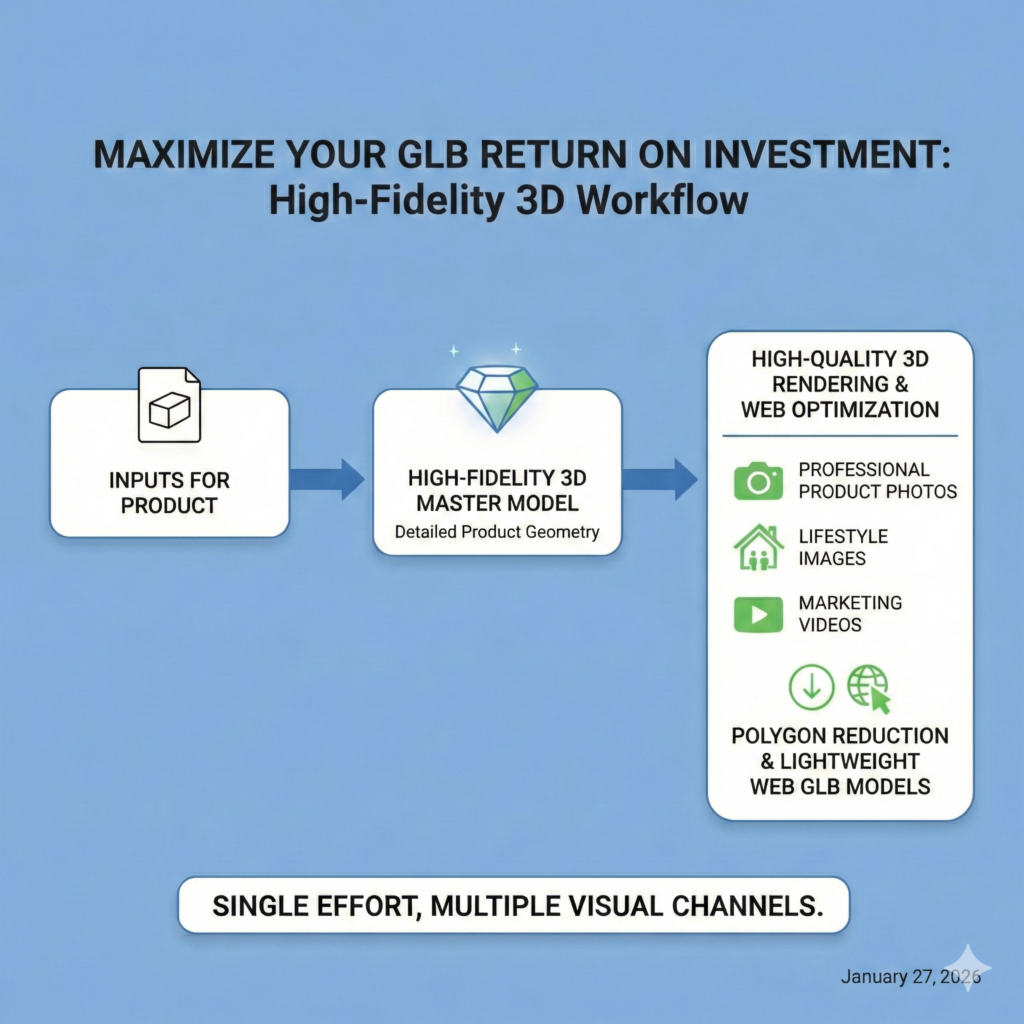
To maximize the return on your investment in GLB, we recommend creating a high-fidelity 3D model of your product first. This 3D model serves as your master asset and is perfect for high-quality 3d rendering, allowing you to generate professional product photos, lifestyle images, and marketing videos. The same 3D asset can be optimized by reducing its polygon count to produce lightweight GLB models for web viewing. This workflow ensures that your initial effort in building the product geometry is fully leveraged across every visual channel.
Why is Amazon Asking Sellers to Upload 3D Models of Products
Amazon is aggressively shifting from static images to immersive shopping experiences to bridge the gap between online browsing and physical retail. There is official communication that Amazon is withdrawing support for 360 spins and instead pushing sellers towards uploading 3D models. Through GLB models, Amazon enables customers to interact with products directly—rotating them, zooming in or using Augmented Reality (AR) to place items in their own living rooms. By standardizing GLB files, Amazon is building a platform where customers can explore every angle, zoom in on details, and inspect items dynamically. Check out Amazon’s guide ‘Getting Started with 3D Content.
This transition builds a superior online shopping ecosystem that creates value for everyone involved. For customers, the ability to verify a product removes the guesswork associated with buying online. This clarity increases buyer confidence. Interactivity drives higher engagement and conversion rates for sellers. Return rates are also reduced as expectations meet reality. Ultimately, this initiative fosters a healthier and more efficient marketplace.
Amazon Technical Specifications for Uploading 3D Model
The following are the technical specifications that a 3D model should adhere to for it to be accepted on Amazon’s platform. These may seem too technical and confusing for you. But you don’t have to worry, as we shall take care of precisely meeting the required specifications. We have the necessary expertise and experience to make sure all GLB models are crafted in accordance with specific platform requirements.

Geometry Requirements
- Model is to be built using real-world-scale, i.e., model dimensions should match assembled product dimensions.
- Model should not exceed 200K triangles.
- Verify model integrity to prevent mesh-related defects such as invalid triangles, edges, vertices, faces, or flipped normals.
- Model should not contain modifiers, animation key frames, cameras, or lights.
Texture Requirements
- Texture files are accepted in .PNG and .JPG format. glTF files with image resources embedded directly in JSON are not accepted.
- Texture resolution should not be less than 2K (2048 px x 2048 px), and not larger than 4K (4096 px x 4096 px).
- Double-sided textures are not supported.
- Supporting textures (.PNG or .JPG) must be one texture per channel. It must be square and a power of two, with a final resolution of no larger than 4K (4,096 x 4,096 pixels), and no smaller than 2K (2,048 x 2,048 pixels), on all sides.
- All materials are PBR Metal-Rough and PBR-compliant.
- UVs should be within one texture atlas, meaning places in the main coordinate space (0,1) and UV space maximized.
- Required Maps – BaseColor map in RGB; Metallic/metalness in linear (Greyscale); Roughness in linear (Greyscale).
Alignment and Orientation Requirements
- All models should be aligned to the floor, wall, or ceiling. Model “front” is determined by the 3D imaging alignment style guide, and all models must be aligned with the model “front” faced toward positive Z space.
- The ‘Up‘ world axis is positive Y.
- The mesh must be aligned in relation to worldspace 0,0,0 properly for its specific product type alignment: “floor”, “wall”, “floor mirror”, or “ceiling”.
File Format Requirements
Accepted 3D file formats – .GLB and .glTF
Click here to view the complete Amazon specifications for 3D Model
Step-by-Step Process of Uploading 3D Model of Your Product on Amazon
- Log in: Go to Amazon Seller Central.
- Navigate: Click on Catalog in the main menu and select Upload Images.
- Select Tool: Click on the “Image Manager” tab at the top left of the screen.
- Search Product: In the left pane, search for your product using its ASIN or SKU.
- Verify Access: Select your product. In the right pane, look for the “Registered Brand Owner” icon to confirm you have permission to edit it.
- Upload: In the right pane, you will see a tab specifically for “3D Models”. Click it, then click the “Upload 3D Model” button.
- Submit: Select your .GLB file and follow the prompts.
- Amazon’s team reviews every model to ensure it matches the product accurately. This approval process typically takes about 2 weeks.
The uploading process has to be done from the seller’s side, as it requires credentials for access verification.
Demystifying 3D file formats
The different 3D file formats could be classified as high-fidelity 3D file formats(.obj, .fbx) and low-fidelity 3D file formats(.gltf, .glb, .usdz)
.OBJ
A universally accepted, open-standard format that stores 3D geometry. It is excellent for exchanging static models between different software but does not support animation.
.FBX
A proprietary format owned by Autodesk, widely used in the film and game industries. It supports complex data, including geometry, textures, lighting, and animation, making it a preferred standard for high-quality 3D content.
.glTF
This open standard 3D format is optimized for fast loading on the web. It minimizes file size while retaining quality, but requires separate texture files.
.GLB
The binary version of glTF. It packs the model, textures, and animation into a single file. It is the preferred format for e-commerce because it is self-contained and easy to share.
.USDZ
Developed by Apple and Pixar, this is a zero-compression archive format designed specifically for Augmented Reality (AR) on iOS devices.
Application of high-fidelity 3D file formats
High-fidelity 3D models, typically saved as OBJ or FBX files, serve as your uncompressed master assets. They contain dense geometry and high-resolution details, making them the perfect source for generating photorealistic product photography and marketing videos. These source files allow you to create stunning visuals that look indistinguishable from real life.
Application of low-fidelity 3D file formats
Low-fidelity 3D models, such as GLB, glTF, and USDZ, are optimized delivery files designed specifically for speed and real-time interaction. These lightweight formats compress complex data to ensure instant loading, making them ideal for web viewers and Augmented Reality (AR) applications. While they sacrifice extreme density, they offer the perfect balance of visual quality and performance for e-commerce.
Difference between 360 Spins and GLB
360 Spins
A 360 spin is a sequence of static 2D images taken at fixed intervals around a product and stitched together using specialized software. When viewed online, the user can rotate the item along a fixed axis. For complete information about 360 spins, visit our blog, A Guide to 360 Product Spins Using 3D Rendering.
GLB
GLB refers to the file format of a 3D model of a product. It is an optimized 3D model for smooth web viewing. The viewer can rotate the product, zoom in to details and inspect the product from every angle. The 3D model is also AR compatible and can be used to view the product in any desired space.
| Feature | 360 Spin | GLB Model |
| File Type | Set of 2D Images A series of static photographs stitched together to create an illusion of movement. | 3D Model A single digital file containing the actual shape, structure, and texture of the product. |
| Interactivity | Limited Rotation Users can typically only rotate the object left and right along a single axis. | Free Movement Users have total freedom to rotate in any direction, tilt, and zoom in to inspect details closely. |
| AR Compatibility | Not Compatible Since it lacks depth data, it cannot be projected into the real world. | Fully Compatible The file is AR-ready, allowing customers to view the item in their room using their phone camera. |
| Visual Quality | High Photorealism Because 360 spin uses actual photos or product renders, details are captured very well. | Optimized Realism Focuses on a balance between high-quality visuals and fast loading speed for smooth performance. |
Frequently Asked Questions
What is a GLB FILE?
A GLB file is a standardized 3D file format that stores a 3D model, its textures, and animation data all in one single file. It is lightweight, easy to share, and opens instantly on most websites and smartphones.
What is the full form of GLB?
GLB stands for GL Transmission Format Binary. It is the binary version of the glTF standard, designed for efficient transmission and loading of 3D content.
How to create a GLB 3D model of my product?
You have to initially create the 3D model and apply textures in software like Blender or 3ds Max. You can create a GLB model by exporting your 3D project from the software using the .glb export settings. Alternatively, you can use 3D scanning apps on your phone or AI tools to generate a model and save it directly as a GLB file.
What is a GLB 3D model used for?
GLB models are primarily used for online retail (e-commerce), Augmented Reality (AR), and VR experiences. Because they are small and self-contained, they are perfect for displaying interactive products on websites and mobile apps.
What is the difference between GLB and glTF?
The main difference is packaging. GLB is a single file containing the model and all its textures. It is best for sharing and uploading. glTF often consists of multiple files (a .gltf file plus separate folders for textures and data). It is better for editing, but messier to share.
How to export a 3D model to GLB format in Blender?
In Blender, go to File > Export > glTF 2.0 (.glb/.gltf). In the export settings menu on the right, ensure the format is set to “glTF Binary (.glb)”. It is also recommended to check the box for “Apply Modifiers” if your model uses them, to ensure the shape looks correct.
How to open a GLB file in Android?
You typically don’t need a special app. Just tap the GLB file in your “Files” or “Downloads” folder. Android’s built-in ‘Scene Viewer’ will open it automatically, allowing you to view it in 3D or place it in your room using AR. If ‘Scene Viewer’ is not available, download a third-party 3D viewer app from the Play Store to view the GLB file.
Can a GLB file be used for AR?
Yes, GLB is the standard format for WebAR (Augmented Reality on the web) on Android devices. For iPhones (iOS), the GLB file usually needs to be converted to Apple’s USDZ format, though many modern web viewers handle this conversion automatically.
What is Amazon’s ‘View in 3D’?
“View in 3D” is an Amazon feature that replaces static product images with an interactive 3D model. It allows shoppers to rotate the product 360 degrees, zoom in, and use the “View in Your Room” button to see if the item fits in their space before buying.
What are Amazon’s 3D model requirements?
Amazon requires a .GLB or .glTF file. The model must be built to real-world scale (1:1), use PBR (Physically Based Rendering) materials. Textures must be square and the file must not contain any hidden cameras or lights. Click here to view the complete Amazon specifications for 3D Model.
Why is Amazon rejecting my GLB with a ‘specular’ error?
Amazon rejects files using the KHR_materials_specular extension because their specific 3D viewer does not support it. To fix this, you must remove the ‘specular’ data from your material settings in Blender or your 3D software before exporting, or use a glTF editor to resave the file without that specific extension.
How to convert GLB TO USDZ for Apple devices?
You can use free online converters use Apple’s own “Reality Converter” app on a Mac. Simply upload your GLB file, and the tool will generate a downloadable .USDZ file for use on iPhones.
Does embedding 3D models slow down my website?
Loading speed will be affected only when the 3D file is not optimized correctly. If you keep the GLB file size low (under 10 MB) and use “lazy loading” (where the model only loads when the user interacts with it), the impact on your site speed is minimal.
How to reduce the file size of GLB without losing quality?
You can use Draco compression, a feature available in most export settings, to shrink geometry size. Additionally, resizing your textures (e.g., from 4K to 2K) and merging complex parts into a single mesh can drastically reduce file size without noticeably hurting visual quality.
How to edit a GLB file after it has been exported?
You can import the GLB file back into 3D software like Blender to make changes. Alternatively, for quick fixes like checking texture brightness or removing extensions, you can use online tools like the Babylon.js Sandbox or gltf.report.
Can I embed a GLB model in a PowerPoint or PDF?
PowerPoint: Yes. In Microsoft PowerPoint (Office 365), you can go to Insert > 3D Models and select your GLB file to place it directly onto a slide.
PDF: No, you cannot directly embed a GLB file into a standard PDF. While PDFs support 3D content, they only accept older, specific formats like U3D or PRC. It is usually better to include a link to a web viewer instead.